
Um Endgeräte redundant anzuschließen wird im klassischen Fall auf LACP zurückgegriffen. LACP beschränkt sich jedoch auf einzelne Switches bzw. Stacks. Im Bereich des Datacenters grefit man auf Multichassis Link Aggregation zurück. Eine sehr einfaches Beispiel wäre Cisco’s VSS. Im Bereich Juniper / EVPN werden Endsysteme über eine Ethernet Segment ID (ESI) über mehrere Leafs angebunden. Folgende Topologie wird im Beispiel eingerichtet:
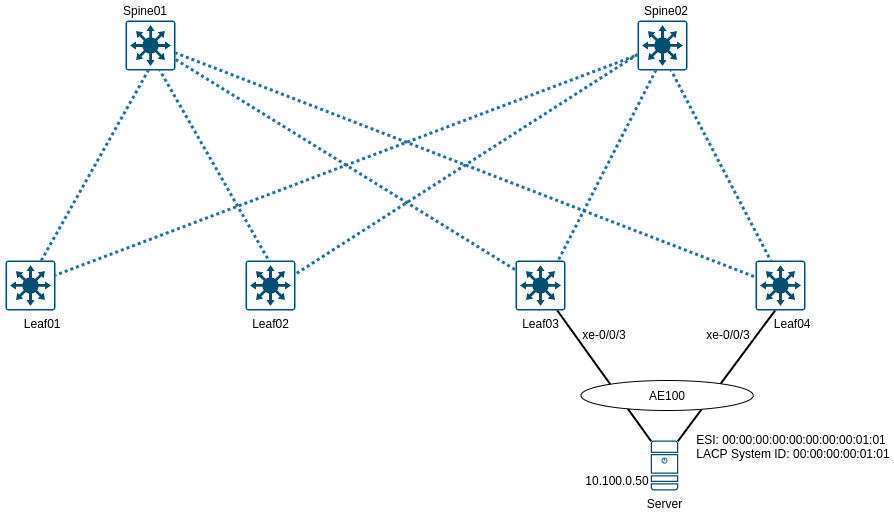
Grundlegendes
Bei der Einrichtung von Multihoming unter EVPN sollte darauf geachtet werden, dass auf alle Leafs das gleiche AE-Interface verwendet wird. Es können unterschiedliche AE-Interfaces verwendet werden (bspw. AE20 auf Leaf01 und AE30 auf Leaf02) die über die ESI miteinander verknüpft werden. Allerdings muss in diesen Fall ein LACP-Admin-Key mitkonfiguriert werden, was die Einrichtung verkompliziert.
Die ESI muss auf allen Leafs eindeutig für ein Bundle sein. Dazu muss noch eine LACP-System-ID eingerichtet werden, auch diese muss auf allen Leafs für das Bundle eindeutig sein. Um Loadbalancing zu nutzen, müssen alle Links auf aktiv gesetzt werden.
Um Endsysteme davon abzuhalten, das Netz mit “sinnlosen” Paketen zu fluten kann zusätzlich Storm-Control eingerichtet werden. Sobald die eingerichteten Schwellwerte überschritten werden, werden die Ports deaktiviert.
Konfigurationsdaten
| Interface(s) | Leafs | Aggregated Interface ESI | LACP System ID |
|---|---|---|---|
| xe-0/0/3 | ae100 | 00:00:00:00:00:00:00:00:01:01 | 00:00:00:00:01:01 |
Konfiguration Leafs
Leaf03 - Multihoming EVPN
1
2
3
4
5
6
7
8
9
10
11
12
13
14
15
16
17
18
19
20
21
22
23
edit interfaces xe-0/0/3
delete unit 0
set description "Server--eth0--bond0"
set ether-options 802.3ad ae100
up
edit ae100
set description "Server--bond0"
set aggregated-ether-options lacp active
set aggregated-ether-options lacp periodic fast
edit unit 0 family ethernet-switching
set interface-mode access
set vlan members VL100
up
up
set esi 00:00:00:00:00:00:00:00:01:01
set esi all-active
set aggregated-ether-options lacp system-id 00:00:00:00:01:01
set aggregated-ether-options minimum-links 1

top edit chassis
set aggregated-devices ethernet device-count 200

commit
Leaf04 - Multihoming EVPN
1
2
3
4
5
6
7
8
9
10
11
12
13
14
15
16
17
18
19
20
21
22
23
24
edit interfaces xe-0/0/3
delete unit 0
set description "Server--eth1--bond0"
set ether-options 802.3ad ae100
up

edit ae100
set description "Server--bond0"
set aggregated-ether-options lacp active
set aggregated-ether-options lacp periodic fast
edit unit 0 family ethernet-switching
set interface-mode access
set vlan members VL100
up
up
set esi 00:00:00:00:00:00:00:00:01:01
set esi all-active
set aggregated-ether-options lacp system-id 00:00:00:00:01:01
set aggregated-ether-options minimum-links 1

top edit chassis
set aggregated-devices ethernet device-count 200

commit
Leaf03 - Stormcontrol
1
2
3
4
5
6
7
8
9
edit forwarding-options storm-control-profiles dc-storm-profile
set all bandwidth-percentage 95
set action-shutdown

top edit interfaces ae100

set unit 0 family ethernet-switching storm-control dc-storm-profile

commit
Leaf04 - Stormcontrol
1
2
3
4
5
6
7
8
9
edit forwarding-options storm-control-profiles dc-storm-profile
set all bandwidth-percentage 95
set action-shutdown

top edit interfaces ae100

set unit 0 family ethernet-switching storm-control dc-storm-profile

commit
show Befehle
Es wird geprüft, ob das LACP-Interface up/up ist.
1
2
3
4
root@Leaf03> show interfaces ae100 terse
Interface Admin Link Proto Local Remote
ae100 up up
ae100.0 up up eth-switch
Die LACP Interfaces werden folgendermaßen angezeigt.
1
2
3
4
5
6
7
root@Leaf03> show lacp interfaces
Aggregated interface: ae100
LACP state: Role Exp Def Dist Col Syn Aggr Timeout Activity
xe-0/0/3 Actor No No Yes Yes Yes Yes Slow Active
xe-0/0/3 Partner No No Yes Yes Yes Yes Slow Active
LACP protocol: Receive State Transmit State Mux State
xe-0/0/3 Current Slow periodic Collecting distributing
Statistiken über LACP.
1
2
3
4
root@Leaf03> show lacp statistics interfaces ae100
Aggregated interface: ae100
LACP Statistics: LACP Rx LACP Tx Unknown Rx Illegal Rx
xe-0/0/3 1853 1707 0 0
Der Server kann sein Gateway anpingen.
1
2
3
4
Server>ping 10.100.0.1
Type escape sequence to abort.
Sending 5, 100-byte ICMP Echos to 10.100.0.1, timeout is 2 seconds:
!!!!!
Konfiguration - Blöcke
1
2
3
4
5
6
7
8
9
10
11
12
13
14
15
16
17
18
19
20
21
22
23
24
25
26
27
28
29
30
31
32
33
34
35
36
37
38
root@Leaf03# show xe-0/0/3
description Server--eth0--bond0;
 ether-options {
  802.3ad ae100;
 }

root@Leaf03# show ae100
description Server--bond0;
  esi {
   00:00:00:00:00:00:00:00:01:01;
   all-active;
  }
aggregated-ether-options {
  lacp {
  active;
  periodic fast;
  system-id 00:00:00:00:01:01;
  }
 }
unit 0 {
 family ethernet-switching {
 interface-mode access;
 vlan {
  members VL100;
  }
 }
}

root@Leaf03# show forwarding-options
storm-control-profiles dc-storm-profile {
all {
  bandwidth-percentage 95;
 }
action-shutdown;
 }
storm-control-profiles default {
  all;
}