
Die drei VRFs sind aktuell voneinander getrennt. Dies soll nun dahingehend erweitert werden, dass die Routen des Datacenters in den Accessbereich (RED, GREEN) veröffentlicht werden und die Accessrouten in den Bereich des Datacenters importiert werden. Dies geschieht über Im- und Export von VRFs. Es werden Routingtabellen exportiert und im entsprechenden VRF wieder importiert. Folgende Topolgie soll konfiguriert werden:
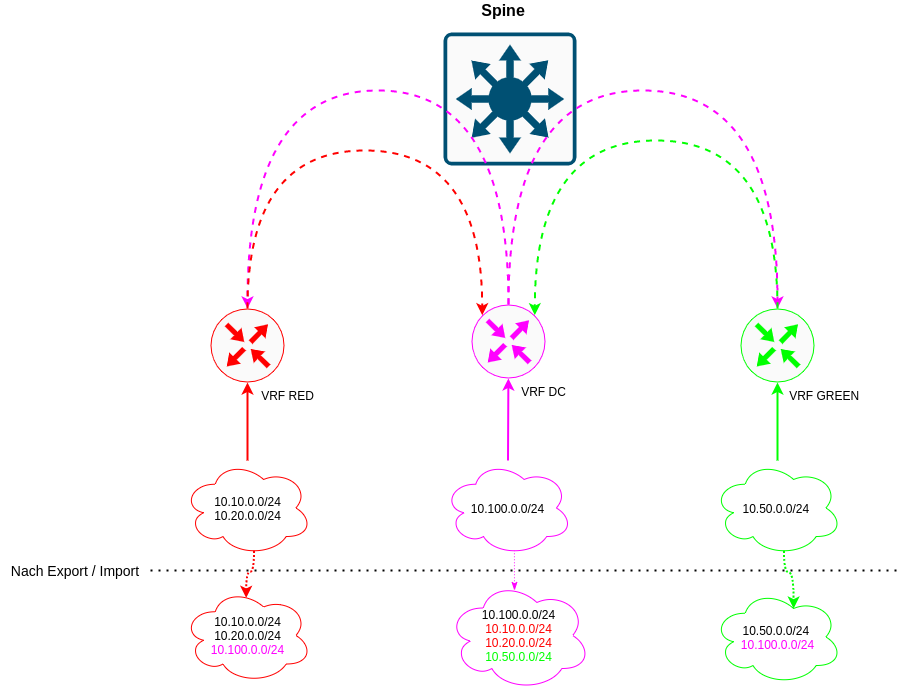
Grundlegendes
Die Routen des jeweiligen VRFs sollen exportiert werden, Routen eines anderen VRFs sollen importiert werden. Dies geschieht über den vrf-export bzw. vrf-import Befehl. Der Im- und Export funktioniert bei Juniper über die Policystatements. Es werden Routen mit Communities getaggt, diese Communities werden beim Import überprüft.
Die Konfiguration und der entsprechende Austausch der Routingtabellen zwischen VRFs ist komplex.
Konfigurationsdaten
VRF DC
| Name Export | Name Import | Community Name | Community Target |
|---|---|---|---|
| export-vrf-dc | |||
| import-from-access | into-vrf-dc | target:65000:103 |
VRF GREEN
| Name Export | Name Import | Community Name | Community Target |
|---|---|---|---|
| export-vrf-green | |||
| import-from-dc | into-vrf-green | target:65000:102 |
VRF RED
| Name Export | Name Import | Community Name | Community Target |
|---|---|---|---|
| export-vrf-red | |||
| import-from-dc | into-vrf-red | target:65000:101 |
Erweiterung der Konfiguration - Spine01 & Spine02
VRF-Export & VRF-Import
Anpassung der Routinginstanz von DC und GREEN
1
2
3
4
5
6
7
8
9
10
edit routing-instances DC
set vrf-export export-vrf-dc
set vrf-import import-from-access
routing-options auto-export family inet unicast
up

edit GREEN
set vrf-import import-from-dc
set vrf-export export-vrf-green
routing-options auto-export family inet unicast
Damit der Export funktioniert, muss der auto-export unter routing-options aktiviert werden. In jeder betroffenen Routing-Instanz.
Anlegen der Policy
1
2
3
4
5
6
7
8
9
10
11
12
13
14
15
16
17
18
19
20
21
22
23
24
25
26
27
28
29
30
31
32
33
34
35
36
top edit policy-options policy-statement export-vrf-dc
edit term 1
set from interface irb.100
set then community add into-vrf-green
set then accept

up
up

edit policy-statement import-from-access
edit term 1
set from community into-vrf-dc
set then accept

up
up

edit policy-statement export-vrf-green
edit term 1
set from interface irb.50
set then community add into-vrf-dc
set then accept

up
up

edit policy-statement import-from-dc
edit term 1
set from community into-vrf-green
set then accept
Anlegen der Communities
top edit policy-options
set community into-vrf-green members target:65000:102
set community into-vrf-dc members target:65000:103

commit
Durch die Policies werden explizit die Interfaces angegeben, von welchen der Export stattfinden soll. Sobald das Interface (bspw. irb.100) zutrifft, wird ein Community-Tag gesetzt. In diesem Beispiel immer das Tag des Ziel-VRFs. Der Aufbau hier liest sich wie folgt: “Exportiere das VRF DC vom Interface IRB.100 und setze das Tag für VRF GREEN”. Der Import liest sich dann wie folgt: “Importiere vom Datacenter, aber nur dann, wenn du das Tag für mein VRF (GREEN) siehst”. Dies ist am Anfang recht verwirrend.
Überprüfung der Routingtabellen
Bei einem erfolgreichen Export sollte 10.50.0.0/24 in der Routingtabelle des DC auftauchen und 10.100.0.0/24 in der Routingtabelle von GREEN.
1
2
3
4
5
6
7
8
9
10
11
12
13
14
15
16
17
18
19
20
21
22
23
24
25
26
27
28
29
30
31
32
33
34
35
36
root@Spine01# run show route table DC.inet.0

DC.inet.0: 5 destinations, 5 routes (5 active, 0 holddown, 0 hidden)
+ = Active Route, - = Last Active, * = Both

10.50.0.0/24 *[Direct/0] 00:23:12
> via irb.50
10.100.0.0/24 *[Direct/0] 5d 02:16:42
> via irb.100
10.100.0.1/32 *[Local/0] 5d 02:16:42
Local via irb.100
10.100.0.254/32 *[Local/0] 5d 02:16:42
Local via irb.100
192.168.0.103/32 *[Direct/0] 5d 02:16:42
> via lo0.103
root@Spine01# run show route table GREEN.inet.0

GREEN.inet.0: 5 destinations, 5 routes (5 active, 0 holddown, 0 hidden)
+ = Active Route, - = Last Active, * = Both

10.50.0.0/24 *[Direct/0] 5d 02:17:22
> via irb.50
10.50.0.1/32 *[Local/0] 5d 02:17:22
Local via irb.50
10.50.0.254/32 *[Local/0] 5d 02:17:22
Local via irb.50
10.100.0.0/24 *[Direct/0] 00:23:52
> via irb.100
192.168.0.102/32 *[Direct/0] 5d 02:17:22
> via lo0.102
VRF-Export und VRF-Import von RED
Anpassung der Routing-Instanz
edit routing-instances RED
set vrf-export export-vrf-red
set vrf-import import-from-dc
set routing-options auto-export family inet unicast
Anlegen der Policy
1
2
3
4
5
6
7
top edit policy-options policy-statement export-vrf-red

edit term 1
set from interface irb.10
set from interface irb.20
set then community add into-vrf-dc
set then accept
Der Import funktioniert auch ohne die folgende Konfiguration, jedoch nur solange bis das VRF GREEN wegfällt.
Der Vollständigkeithalber:
1
2
3
top edit policy-options policy-statement export-vrf-dc
edit term 1
set then community add into-vrf-red
Die Import-Policy für das VRF DC muss um das VRF RED erweitert werden.
1
2
edit policy-statement import-from-dc term 1
set from community into-vrf-red
Anlegen der Community
1
2
top edit policy-options
set community into-vrf-red members target:65000:101
Jetzt sollten die entsprechenden Routingtabellen um die ausgetauschten Routen erweitert sein.
1
2
3
4
5
6
7
8
9
10
11
12
13
14
15
16
17
18
19
20
21
22
23
24
25
26
27
28
29
30
31
32
33
34
35
36
37
38
39
40
root@Spine01# run show route table DC.inet.0

DC.inet.0: 7 destinations, 7 routes (7 active, 0 holddown, 0 hidden)
+ = Active Route, - = Last Active, * = Both

10.10.0.0/24 *[Direct/0] 00:00:44
> via irb.10
10.20.0.0/24 *[Direct/0] 00:00:44
> via irb.20
10.50.0.0/24 *[Direct/0] 10:39:40
> via irb.50
10.100.0.0/24 *[Direct/0] 5d 12:33:10
> via irb.100
10.100.0.1/32 *[Local/0] 5d 12:33:10
Local via irb.100
10.100.0.254/32 *[Local/0] 5d 12:33:10
Local via irb.100
192.168.0.103/32 *[Direct/0] 5d 12:33:10
> via lo0.103
root@Spine01# run show route table RED.inet.0

RED.inet.0: 8 destinations, 8 routes (8 active, 0 holddown, 0 hidden)
+ = Active Route, - = Last Active, * = Both

10.10.0.0/24 *[Direct/0] 5d 12:06:01
> via irb.10
10.10.0.1/32 *[Local/0] 5d 12:06:01
Local via irb.10
10.10.0.254/32 *[Local/0] 5d 12:06:01
Local via irb.10
10.20.0.0/24 *[Direct/0] 5d 12:32:40
> via irb.20
10.20.0.1/32 *[Local/0] 5d 12:32:40
Local via irb.20
10.20.0.254/32 *[Local/0] 5d 12:32:40
Local via irb.20
10.100.0.0/24 *[Direct/0] 00:00:14
> via irb.100
192.168.0.101/32 *[Direct/0] 5d 12:32:40
> via lo0.101
Damit wurden die entsprechenden Routingtabellen ausgetauscht.
Konfigurationsblöcke
1
2
3
4
5
6
7
8
9
10
11
12
13
14
15
16
17
18
19
20
21
22
23
24
25
26
27
28
29
30
31
32
33
34
35
36
37
38
39
40
41
42
43
44
45
46
47
48
49
50
51
52
53
54
55
56
57
58
59
60
61
62
63
64
65
66
67
68
69
70
71
72
73
74
75
76
77
78
79
80
81
82
83
84
85
86
87
88
89
90
91
92
93
94
95
96
97
98
99
100
101
102
103
104
105
106
107
108
109
110
111
112
113
114
115
116
117
118
119
120
121
122
123
124
125
126
127
128
129
root@Spine01# show | no-more
DC {
  routing-options {
  auto-export {
  family inet {
   unicast;
  }
 }
}
description VRF-DC;
instance-type vrf;
interface irb.100;
interface lo0.103;
route-distinguisher 192.168.0.1:103;
vrf-import import-from-access;
vrf-export export-vrf-dc;
vrf-target target:65000:103;
}
GREEN {
  routing-options {
  auto-export {
  family inet {
   unicast;
  }
 }
}
description VRF-GREEN;
instance-type vrf;
forwarding-options {
dhcp-relay {
  forward-only;
  server-group {
  DHCP-Server {
  10.50.0.2;
 }
}
active-server-group DHCP-Server;
group DHCP-Server {
  interface irb.50;
  }
 }
}
interface irb.50;
interface lo0.102;
route-distinguisher 192.168.0.1:102;
vrf-import import-from-dc;
vrf-export export-vrf-green;
vrf-target target:65000:102;
}
RED {
routing-options {
  auto-export {
  family inet {
   unicast;
  }
 }
}
description VRF-RED;
instance-type vrf;
forwarding-options {
dhcp-relay {
  forward-only;
  server-group {
   DHCP-Server {
    10.10.0.2;
    10.20.0.2;
  }
}
active-server-group DHCP-Server;
group DHCP-Server {
  interface irb.10;
  interface irb.20;
  }
 }
}
interface irb.10;
interface irb.20;
interface lo0.101;
route-distinguisher 192.168.0.1:101;
vrf-import import-from-dc;
vrf-export export-vrf-red;
vrf-target target:65000:101;
}


root@Spine01# show | no-more
policy-statement export-vrf-dc {
  term 1 {
   from interface irb.100;
   then {
    community add into-vrf-green;
    accept;
  }
 }
}
policy-statement export-vrf-green {
term 1 {
  from interface irb.50;
  then {
   community add into-vrf-dc;
   accept;
  }
 }
}
policy-statement export-vrf-red {
term 1 {
  from interface [ irb.10 irb.20 ];
  then {
   community add into-vrf-dc;
   accept;
  }
 }
}
policy-statement import-from-access {
term 1 {
   from community into-vrf-dc;
   then accept;
  }
}
policy-statement import-from-dc {
term 1 {
   from community [ into-vrf-green into-vrf-red ];
   then accept;
  }
}

community into-vrf-dc members target:65000:103;
community into-vrf-green members target:65000:102;
community into-vrf-red members target:65000:101;