Wireguard ist eine Software zum Aufbau von verschlüsselten Verbindungen.
Die Software ist ab Linux Kernel 5.6 direkt im Kern eingebaut und erlaubt
somit höhere Verarbeitungsgeschwindigkeiten im Vergleich zu IPSec oder OpenVPN.
VyOS Router sind ebenfalls in der Lage, Wireguard Verbindungen aufzubauen.
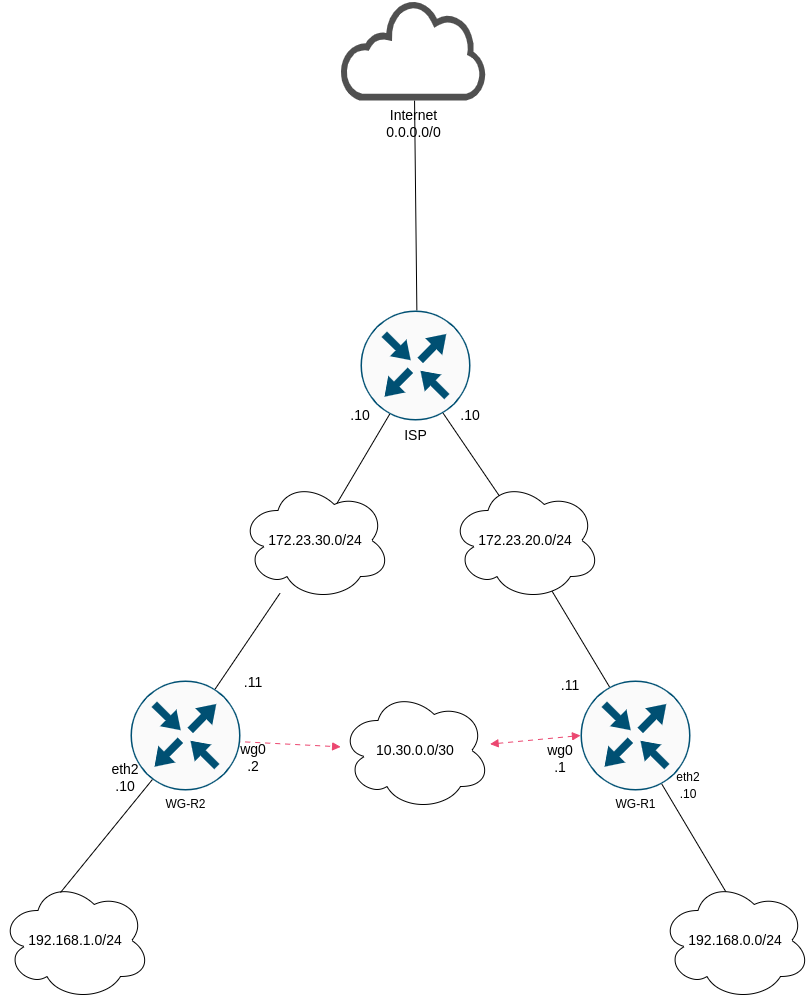
Im folgenden Beispiel soll ein Site-2-Site Tunnel aufgebaut werden.
Topologie

Basis Konfigurationen
WG Router 1
1
2
3
4
5
6
7
8
9
10
11
12
13
14
15
16
17
18
19
20
21
| vyos@wgr1# show interfaces
ethernet eth1 {
address 172.23.20.11/24
description Uplink->ISP
hw-id 00:0c:29:47:22:3d
}
ethernet eth2 {
address 192.168.0.10/24
description LAN
hw-id 00:0c:29:47:22:47
}
loopback lo {
}
vyos@wgr1# sh protocols
static {
route 0.0.0.0/0 {
next-hop 172.23.20.10 {
}
}
}
|
WG Router 2
1
2
3
4
5
6
7
8
9
10
11
12
13
14
15
16
17
18
19
20
21
| vyos@wgr2# show interfaces
ethernet eth1 {
address 172.23.30.11/24
description Uplink->ISP
hw-id 00:0c:29:40:be:74
}
ethernet eth2 {
address 192.168.1.10/24
description LAN
hw-id 00:0c:29:40:be:7e
}
loopback lo {
}
vyos@wgr2# sh protocols
static {
route 0.0.0.0/0 {
next-hop 172.23.30.10 {
}
}
}
|
ISP Router
1
2
3
4
5
6
7
8
9
10
11
12
13
14
15
16
17
18
19
20
21
22
23
24
25
26
27
28
29
30
31
32
33
34
35
36
37
38
39
40
41
42
| vyos@ISP# show interfaces
ethernet eth0 {
address dhcp
description Uplink->Internet
hw-id 00:0c:29:e2:1c:9b
}
ethernet eth1 {
address 172.23.20.10/24
description "--> WGR1"
hw-id 00:0c:29:e2:1c:a5
}
ethernet eth2 {
address 172.23.30.10/24
description "--> WGR2"
hw-id 00:0c:29:e2:1c:af
}
loopback lo {
}
vyos@ISP# sh nat
source {
rule 998 {
description "NAT WG R2"
outbound-interface eth0
source {
address 172.23.30.0/24
}
translation {
address masquerade
}
}
rule 999 {
description "NAT WG R1"
outbound-interface eth0
source {
address 172.23.20.0/24
}
translation {
address masquerade
}
}
}
|
Wireguard Konfiguration
Es müssen Schlüsselpaare erstellt werden.
WG Router 1 & 2
1
2
3
| vyos@wgr1:~$ generate pki wireguard key-pair
Private key: 4IyNUD+pduTl4cdL1EKVs44Cdx3HtdxCFPeomXod2HM=
Public key: Pz2oyw2876hk5+dOOqwWoN4bFsM9ThR20efHbgqAg1c=
|
1
2
3
| vyos@wgr2:~$ generate pki wireguard key-pair
Private key: WD67y3hWSGBDq4doe8399Sb48R6DHMZFgiSXHNhOrFU=
Public key: +Dz6G2VezJ9aGXFOVOsbl/ZU7HjaPe+Ej7CpAIjWX14=
|
Alle Schlüsselpaare sollten gesichert werden.
Jetzt werden beide Router als Wireguard Peer konfiguriert, verwendet wird das
Interface wg0.
WG Router 1
1
2
3
4
5
6
7
8
9
10
11
12
13
| vyos@wgr1# show interfaces wireguard wg0
address 10.30.0.1/30
description VPN->WG-R2
mtu 1420
peer WG-R2 {
address 172.23.30.11
allowed-ips 192.168.1.0/24
allowed-ips 10.30.0.0/30
port 51820
public-key DOEIvmBXgMOY3va+xCo9ag4F0pzTOC5VsfwuSbESvVM=
}
port 51820
private-key 4IyNUD+pduTl4cdL1EKVs44Cdx3HtdxCFPeomXod2HM=
|
WG Router 2
1
2
3
4
5
6
7
8
9
10
11
12
13
| vyos@wgr2# show interfaces wireguard wg0
address 10.30.0.2/30
description VPN->WG-R1
mtu 1420
peer WG-R1 {
address 172.23.20.11
allowed-ips 192.168.0.0/24
allowed-ips 10.30.0.0/30
port 51820
public-key Pz2oyw2876hk5+dOOqwWoN4bFsM9ThR20efHbgqAg1c=
}
port 51820
private-key SOfyUcADKHg/aVBCv7WFJjfDzaIGFRWMSm+TDwNvTGc=
|
Damit beide internen Netze erreichbar sind, wird eine statische Route gesetzt.
WG Router 1
1
| set protocols static route 192.168.1.0/24 interface wg0
|
WG Router 2
1
| set protocols static route 192.168.0.0/24 interface wg0
|
Damit sollte der Tunnel online sein.
Show Befehle
1
2
3
4
5
6
| vyos@wgr1:~$ show interfaces wireguard
Codes: S - State, L - Link, u - Up, D - Down, A - Admin Down
Interface IP Address S/L Description
--------- ---------- --- -----------
wg0 10.30.0.1/30 u/u VPN->WG-R2
|
1
2
3
4
5
6
7
8
9
10
| vyos@wgr1:~$ show interfaces wireguard wg0 summary
interface: wg0
public key: Pz2oyw2876hk5+dOOqwWoN4bFsM9ThR20efHbgqAg1c=
private key: (hidden)
listening port: 51820
peer: DOEIvmBXgMOY3va+xCo9ag4F0pzTOC5VsfwuSbESvVM=
endpoint: 172.23.30.11:51820
allowed ips: 192.168.1.0/24
|
Ein ping sollte jetzt die interne Router IP von WG-R2 erreichen.
1
2
3
4
5
6
7
8
9
| vyos@wgr1:~$ ping 192.168.1.10
PING 192.168.1.10 (192.168.1.10) 56(84) bytes of data.
64 bytes from 192.168.1.10: icmp_seq=1 ttl=64 time=1.11 ms
64 bytes from 192.168.1.10: icmp_seq=2 ttl=64 time=2.37 ms
64 bytes from 192.168.1.10: icmp_seq=3 ttl=64 time=9.97 ms
64 bytes from 192.168.1.10: icmp_seq=4 ttl=64 time=2.18 ms
^C
--- 192.168.1.10 ping statistics ---
4 packets transmitted, 4 received, 0% packet loss, time 3007ms
|
Damit ist die Konfiguration abgeschlossen.