
In den letzten Beispielen wurde statische Routen gesetzt, um lokale Netze zur Verfügung zu stellen. Im folgenden Beispiel kommen sieben Netze hinzu. Diese werden per BGP announciert werden, dafür wird lediglich eine statische Route zum Loopback Interface des Nachbarrouters benötigt.
Topologie
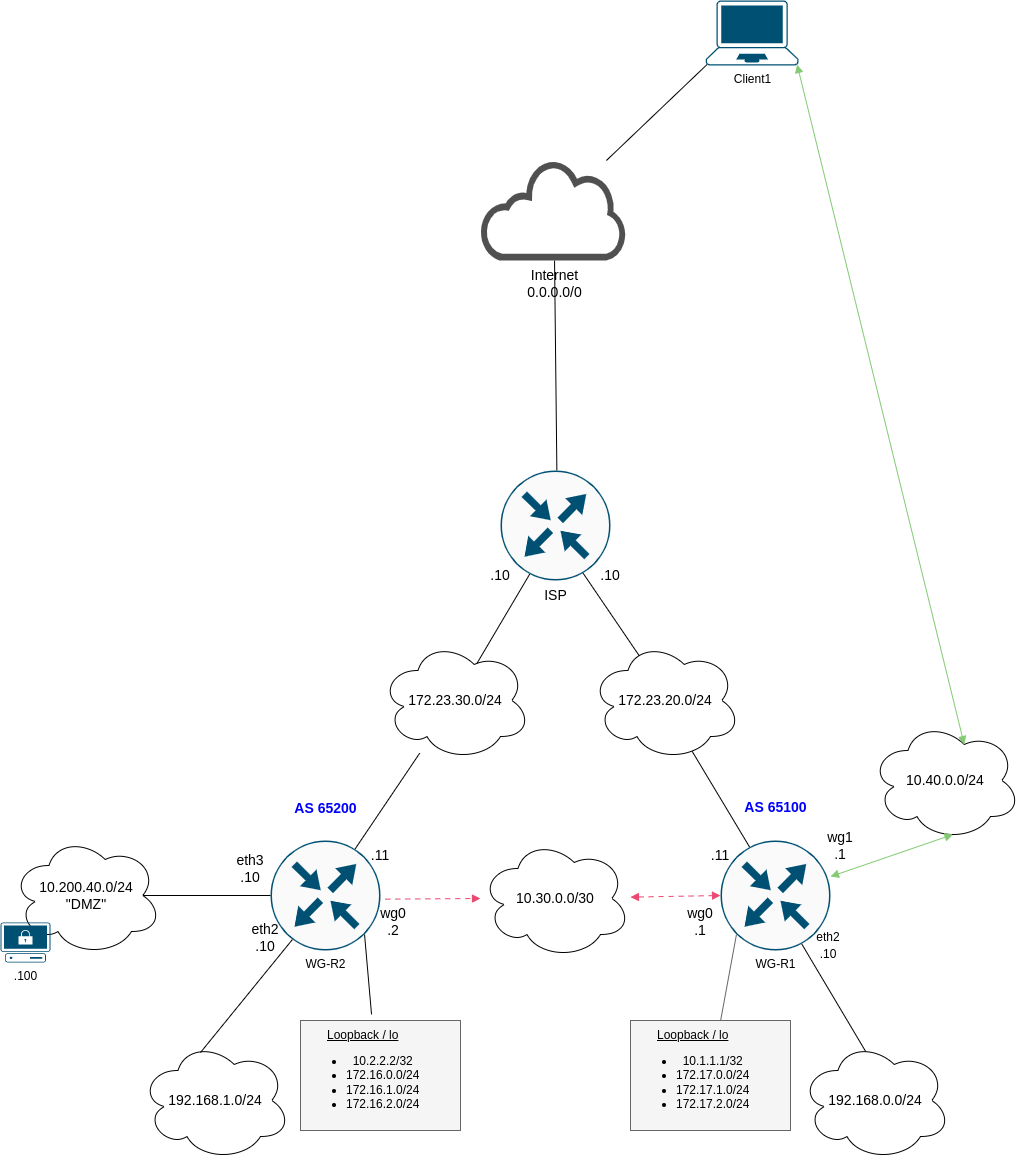
Anpassungen WG-R2
Das Loopback Interface wird eingerichtet, die statischen Routen werden entfernt.
1
2
3
set interfaces loopback lo address 10.2.2.2/32
del protocols static route 10.40.0.0/24
del protocols static route 192.168.0.0/24
Die 172.16er Netze werden ebenfalls aufs Loopback konfiguriert, das “DMZ” Interface eth3 wird konfiguriert.
1
2
3
4
set interfaces loopback lo address 172.16.0.1/24
set interfaces loopback lo address 172.16.1.1/24
set interfaces loopback lo address 172.16.2.1/24
set interface eth3 address 10.200.40.10/24
Die Loopback Interfaces müssen von beiden Routern erreichbar sein, damit die BGP Session aufgebaut werden kann. Dies wird über eine statische Route realisiert.
1
2
set protocols static route 10.1.1.1/32 interface wg0
set interfaces wireguard wg0 peer WG-R1 allowed-ips 10.1.1.1/32
Die Routingtabelle sollte folgendermaßen aussehen:
1
2
3
4
5
6
7
8
9
10
11
S>* 0.0.0.0/0 [1/0] via 172.23.30.10, eth1, weight 1, 05:34:45
S>* 10.1.1.1/32 [1/0] is directly connected, wg0, weight 1, 00:04:59
C>* 10.2.2.2/32 is directly connected, lo, 00:21:48
C>* 10.10.10.0/24 is directly connected, eth0, 05:34:49
C>* 10.30.0.0/30 is directly connected, wg0, 05:34:46
C>* 10.200.40.0/24 is directly connected, eth3, 02:43:56
C>* 172.16.0.0/24 is directly connected, lo, 00:15:08
C>* 172.16.1.0/24 is directly connected, lo, 00:15:08
C>* 172.16.2.0/24 is directly connected, lo, 00:15:08
C>* 172.23.30.0/24 is directly connected, eth1, 05:34:49
C>* 192.168.1.0/24 is directly connected, eth2, 03:04:09
Anpassungen WG-R1
Das Loopback Interface wird eingerichtet, die statischen Routen werden entfernt.
1
2
set interfaces loopback lo address 10.1.1.1/32
del protocols static route 192.168.1.0/24
Die 172.17er Netze werden ebenfalls aufs Loopback konfiguriert.
1
2
3
set interfaces loopback lo address 172.17.0.1/24
set interfaces loopback lo address 172.17.1.1/24
set interfaces loopback lo address 172.17.2.1/24
Die Loopback Interfaces müssen von beiden Routern erreichbar sein, damit die BGP Session aufgebaut werden kann. Dies wird über eine statische Route realisiert.
1
2
set protocols static route 10.2.2.2/32 interface wg0
set interfaces wireguard wg0 peer WG-R1 allowed-ips 10.2.2.2/32
Beide Loopbacks sollten jetzt pingbar sein, die Routingtabelle sollte folgendermaßen aussehen:
1
2
3
4
5
6
7
8
9
10
11
S>* 0.0.0.0/0 [1/0] via 172.23.20.10, eth1, weight 1, 05:32:16
C>* 10.1.1.1/32 is directly connected, lo, 00:05:27
S>* 10.2.2.2/32 [1/0] is directly connected, wg0, weight 1, 00:01:18
C>* 10.10.10.0/24 is directly connected, eth0, 05:32:20
C>* 10.30.0.0/30 is directly connected, wg0, 05:32:17
C>* 10.40.0.0/24 is directly connected, wg1, 04:27:12
C>* 172.17.0.0/24 is directly connected, lo, 00:05:27
C>* 172.17.1.0/24 is directly connected, lo, 00:05:27
C>* 172.17.2.0/24 is directly connected, lo, 00:05:27
C>* 172.23.20.0/24 is directly connected, eth1, 05:32:20
C>* 192.168.0.0/24 is directly connected, eth2, 05:32:20
BGP Policies
Folgende Policies werden im BGP eingerichtet:
- Alle “connected” Netze werden ins BGP redistributiert.
- Ausnahme bildet das Managementnetz 10.10.10.0/24, welches auf eth0 liegt.
- Es wird ein Template “wireguard” erstellen.
- Maximal 10 Routen werden angenommen.
- Es wird das Passwort pass1234 verwendet.
- Routen werden über bgp-out exportiert.
- Routen werden über bgp-in importiert.
- Es werden nur Routen mit “erlaubten” Communities angenommen.
- Default Routen werden verworfen.
WG-R2 konfigurieren
Community-List
1
2
3
4
5
6
7
8
vyos@wgr2# show policy community-list
 community-list 1 {
     description "permit AS65100 routing updates"
     rule 1 {
         action permit
         regex 65100:100
     }
 }
Prefixlists
1
2
3
4
5
6
7
8
9
10
11
12
13
14
15
16
17
18
19
20
21
22
23
24
25
26
27
28
29
vyos@wgr2# show policy prefix-list
 prefix-list connected-into-bgp {
     description "connected prefixes into bgp"
     rule 5 {
         action permit
         le 24
         prefix 172.16.0.0/16
     }
     rule 10 {
         action permit
         prefix 10.200.40.0/24
     }
     rule 15 {
         action permit
         prefix 192.168.1.0/24
     }
 }
 prefix-list deny-incoming-routes {
     description "deny default gw"
     rule 5 {
         action deny
         prefix 0.0.0.0/0
     }
     rule 10 {
         action permit
         le 32
         prefix 0.0.0.0/0
     }
 }
Route-Maps
1
2
3
4
5
6
7
8
9
10
11
12
13
14
15
16
17
18
19
20
21
22
23
24
25
26
27
28
29
30
31
32
33
34
35
36
37
38
39
40
41
42
43
44
45
46
47
48
vyos@wgr2# show policy route-map
 route-map bgp-in {
     description "BGP incoming"
     rule 10 {
         action permit
         match {
             community {
                 community-list 1
             }
             ip {
                 address {
                     prefix-list deny-incoming-routes
                 }
             }
         }
     }
 }
 route-map bgp-out {
     description "BGP outgoing"
     rule 10 {
         action permit
         match {
             ip {
                 address {
                     prefix-list connected-into-bgp
                 }
             }
         }
         set {
             community {
                 replace 65200:100
             }
         }
     }
 }
 route-map connected-into-bgp {
     description "connected into bgp"
     rule 5 {
         action permit
         match {
             ip {
                 address {
                     prefix-list connected-into-bgp
                 }
             }
         }
     }
 }
BGP
1
2
3
4
5
6
7
8
9
10
11
12
13
14
15
16
17
18
19
20
21
22
23
24
25
26
27
28
29
30
31
32
33
34
35
36
vyos@wgr2# sh protocols bgp
 address-family {
     ipv4-unicast {
         redistribute {
             connected {
                 route-map connected-into-bgp
             }
         }
     }
 }
 neighbor 10.1.1.1 {
     peer-group wireguard
     remote-as 65100
 }
 parameters {
     router-id 10.2.2.2
 }
 peer-group wireguard {
     address-family {
         ipv4-unicast {
             maximum-prefix 10
             route-map {
                 export bgp-out
                 import bgp-in
             }
             soft-reconfiguration {
                 inbound
             }
         }
     }
     description "Wireguard Routers BGP"
     disable-connected-check
     password pass1234
     update-source lo
 }
 system-as 65200
WG-R1 konfigurieren
Community-List
1
2
3
4
5
6
7
8
vyos@wgr1# show policy community-list
 community-list 1 {
     description "permit AS65200 routing updates"
     rule 1 {
         action permit
         regex 65200:100
     }
 }
Prefixlists
1
2
3
4
5
6
7
8
9
10
11
12
13
14
15
16
17
18
19
20
21
22
23
24
25
26
27
28
29
30
vyos@wgr1# show policy prefix-list
 prefix-list connected-into-bgp {
     description "connected prefixes into bgp"
     rule 5 {
         action permit
         le 24
         prefix 172.17.0.0/16
     }
     rule 10 {
         action permit
         prefix 192.168.0.0/24
     }
     rule 15 {
         action permit
         prefix 10.40.0.0/24
     }
 }
 prefix-list deny-incoming-routes {
     description "filter incoming routes"
     rule 5 {
         action deny
         prefix 0.0.0.0/0
     }
     rule 10 {
         action permit
         le 32
         prefix 0.0.0.0/0
     }
 }
Route-Maps
1
2
3
4
5
6
7
8
9
10
11
12
13
14
15
16
17
18
19
20
21
22
23
24
25
26
27
28
29
30
31
32
33
34
35
36
37
38
39
40
41
42
43
44
45
46
47
48
vyos@wgr1# sh policy route-map
 route-map bgp-in {
     description "BGP incoming"
     rule 10 {
         action permit
         match {
             community {
                 community-list 1
             }
             ip {
                 address {
                     prefix-list deny-incoming-routes
                 }
             }
         }
     }
 }
 route-map bgp-out {
     description "BGP outgoing"
     rule 10 {
         action permit
         match {
             ip {
                 address {
                     prefix-list connected-into-bgp
                 }
             }
         }
         set {
             community {
                 replace 65100:100
             }
         }
     }
 }
 route-map connected-into-bgp {
     description "connected into bgp"
     rule 5 {
         action permit
         match {
             ip {
                 address {
                     prefix-list connected-into-bgp
                 }
             }
         }
     }
 }
BGP
1
2
3
4
5
6
7
8
9
10
11
12
13
14
15
16
17
18
19
20
21
22
23
24
25
26
27
28
29
30
31
32
33
34
35
36
vyos@wgr1# sh protocols bgp
 address-family {
     ipv4-unicast {
         redistribute {
             connected {
                 route-map connected-into-bgp
             }
         }
     }
 }
 neighbor 10.2.2.2 {
     peer-group wireguard
     remote-as 65200
 }
 parameters {
     router-id 10.1.1.1
 }
 peer-group wireguard {
     address-family {
         ipv4-unicast {
             maximum-prefix 10
             route-map {
                 export bgp-out
                 import bgp-in
             }
             soft-reconfiguration {
                 inbound
             }
         }
     }
     description "Wireguard Routers BGP"
     disable-connected-check
     password pass1234
     update-source lo
 }
 system-as 65100
Netze im VPN freischalten
Alle Netze müssen im Site-2-Site Tunnel noch freigeschaltet werden.
WG-R1
1
2
3
4
5
6
7
8
9
10
11
12
13
14
15
16
vyos@wgr1# show interfaces wireguard wg0
 address 10.30.0.1/30
 description VPN->WG-R2
 mtu 1420
 peer WG-R2 {
     address 172.23.30.11
     allowed-ips 10.30.0.0/30
     allowed-ips 192.168.1.0/24
     allowed-ips 10.200.40.0/24
     allowed-ips 172.16.0.0/16
     allowed-ips 10.2.2.2/32
     port 51820
     public-key DOEIvmBXgMOY3va+xCo9ag4F0pzTOC5VsfwuSbESvVM=
 }
 port 51820
 private-key 4IyNUD+pduTl4cdL1EKVs44Cdx3HtdxCFPeomXod2HM=
WG-R2
1
2
3
4
5
6
7
8
9
10
11
12
13
14
15
16
vyos@wgr2# show interfaces wireguard wg0
 address 10.30.0.2/30
 description VPN->WG-R1
 mtu 1420
 peer WG-R1 {
     address 172.23.20.11
     allowed-ips 10.30.0.0/30
     allowed-ips 172.16.0.0/16
     allowed-ips 10.40.0.0/24
     allowed-ips 192.168.0.0/24
     allowed-ips 10.1.1.1/32
     port 51820
     public-key Pz2oyw2876hk5+dOOqwWoN4bFsM9ThR20efHbgqAg1c=
 }
 port 51820
 private-key SOfyUcADKHg/aVBCv7WFJjfDzaIGFRWMSm+TDwNvTGc=
Anschließend sollte der Zugriff auf alle Netze funktionieren.
Show Befehle
Die Routingtabellen sollten in etwa wie folgt aussehen:
1
2
3
4
5
6
7
8
9
10
11
12
13
vyos@wgr2:~$ sh ip bgp summary

IPv4 Unicast Summary (VRF default):
BGP router identifier 10.2.2.2, local AS number 65200 vrf-id 0
BGP table version 52
RIB entries 19, using 3648 bytes of memory
Peers 1, using 724 KiB of memory
Peer groups 1, using 64 bytes of memory

Neighbor        V         AS   MsgRcvd   MsgSent   TblVer  InQ OutQ  Up/Down State/PfxRcd   PfxSnt Desc
10.1.1.1        4      65100       252       257        0    0    0 02:45:35            5        5 N/A

Total number of neighbors 1
1
2
3
4
5
6
7
8
9
10
11
12
13
vyos@wgr2:~$ sh ip bgp

  Network          Next Hop            Metric LocPrf Weight Path
*> 10.40.0.0/24     10.1.1.1                 0             0 65100 ?
*> 10.200.40.0/24   0.0.0.0                  0         32768 ?
*> 172.16.0.0/24    0.0.0.0                  0         32768 ?
*> 172.16.1.0/24    0.0.0.0                  0         32768 ?
*> 172.16.2.0/24    0.0.0.0                  0         32768 ?
*> 172.17.0.0/24    10.1.1.1                 0             0 65100 ?
*> 172.17.1.0/24    10.1.1.1                 0             0 65100 ?
*> 172.17.2.0/24    10.1.1.1                 0             0 65100 ?
*> 192.168.0.0/24   10.1.1.1                 0             0 65100 ?
*> 192.168.1.0/24   0.0.0.0                  0         32768 ?
1
2
3
4
5
6
7
8
9
10
11
12
13
14
15
16
17
18
19
20
21
22
23
24
25
26
27
28
29
vyos@wgr2:~$ sh ip route
Codes: K - kernel route, C - connected, S - static, R - RIP,
       O - OSPF, I - IS-IS, B - BGP, E - EIGRP, N - NHRP,
       T - Table, v - VNC, V - VNC-Direct, A - Babel, F - PBR,
       f - OpenFabric,
       > - selected route, * - FIB route, q - queued, r - rejected, b - backup
       t - trapped, o - offload failure

S>* 0.0.0.0/0 [1/0] via 172.23.30.10, eth1, weight 1, 03:43:29
S>* 10.1.1.1/32 [1/0] is directly connected, wg0, weight 1, 03:43:29
C>* 10.2.2.2/32 is directly connected, lo, 03:43:32
C>* 10.10.10.0/24 is directly connected, eth0, 03:43:31
C>* 10.30.0.0/30 is directly connected, wg0, 03:43:29
B>  10.40.0.0/24 [20/0] via 10.1.1.1 (recursive), weight 1, 02:40:11
  *                       via 10.1.1.1, wg0 onlink, weight 1, 02:40:11
C>* 10.200.40.0/24 is directly connected, eth3, 03:43:31
C>* 172.16.0.0/24 is directly connected, lo, 03:43:32
C>* 172.16.1.0/24 is directly connected, lo, 03:43:32
C>* 172.16.2.0/24 is directly connected, lo, 03:43:32
B>  172.17.0.0/24 [20/0] via 10.1.1.1 (recursive), weight 1, 02:46:11
  *                        via 10.1.1.1, wg0 onlink, weight 1, 02:46:11
B>  172.17.1.0/24 [20/0] via 10.1.1.1 (recursive), weight 1, 02:46:11
  *                        via 10.1.1.1, wg0 onlink, weight 1, 02:46:11
B>  172.17.2.0/24 [20/0] via 10.1.1.1 (recursive), weight 1, 02:46:11
  *                        via 10.1.1.1, wg0 onlink, weight 1, 02:46:11
C>* 172.23.30.0/24 is directly connected, eth1, 03:43:31
B>  192.168.0.0/24 [20/0] via 10.1.1.1 (recursive), weight 1, 02:46:11
  *                         via 10.1.1.1, wg0 onlink, weight 1, 02:46:11
C>* 192.168.1.0/24 is directly connected, eth2, 03:43:31
Zugriff vom Client
Der Zugriff aus dem VPN Pool sollte ebenfalls funktionieren.
Ein Trace wird folgendes ausgeben:
1
2
3
4
5
client1:~# traceroute 10.200.40.100
traceroute to 10.200.40.100 (10.200.40.100), 30 hops max, 46 byte packets
 1  10.40.0.1 (10.40.0.1)  1.504 ms  1.890 ms  1.108 ms
 2  10.30.0.2 (10.30.0.2)  3.753 ms  3.686 ms  2.536 ms
 3  10.200.40.100 (10.200.40.100)  3.284 ms  4.484 ms  3.351 ms
Zugriff auf den Webserver funktioniert ebenfalls:
1
2
client1:~# curl 10.200.40.100
<html><body><h1>It works!</h1></body></html>
Damit ist die BGP Einrichtung abgeschlossen.