
Der Beitrag “VxLAN mit Cumulus” wird in diesen Beispiel um einen VyOS Router erweitert. VyOS liefert die Funktionalitäten von VxLAN mit, jedoch ist die Implementierung recht alt und führt zu einer aufwendigen Konfiguration der vorhandenen Leafs und Spines.
Es wird folgende Topologie verwendet:
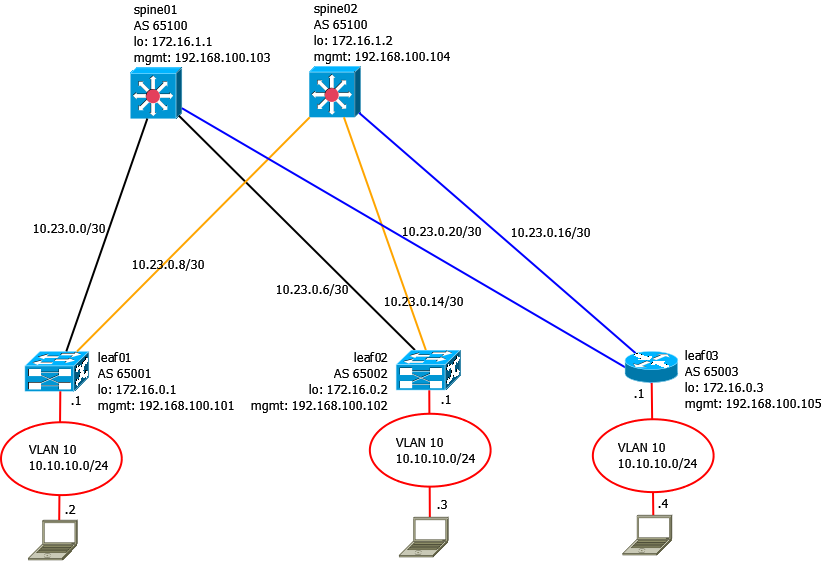
Die Konfigurationen von Spine01-02 und Leaf01-02 bleiben vorerst gleich.
Es werden statische VxLAN Tunnel unter VyOS eingerichtet.
Interfaces & allgemeine Konfiguration
1
2
3
4
5
6
7
8
9
10
11
12
13
14
15
16
17
18
19
20
21
22
23
24
25
26
27
28
29
30
31
32
33
34
set interfaces ethernet eth0 address '192.168.100.114/24'
set interfaces ethernet eth0 description 'MGM'
set interfaces ethernet eth0 duplex 'auto'
set interfaces ethernet eth0 hw-id '00:0c:29:d7:67:1f'
set interfaces ethernet eth0 smp-affinity 'auto'
set interfaces ethernet eth0 speed 'auto'

set interfaces ethernet eth1 address '10.23.0.18/30'
set interfaces ethernet eth1 description 'Uplink--Spine02'
set interfaces ethernet eth1 duplex 'auto'
set interfaces ethernet eth1 hw-id '00:0c:29:d7:67:29'
set interfaces ethernet eth1 mtu '9000'
set interfaces ethernet eth1 smp-affinity 'auto'
set interfaces ethernet eth1 speed 'auto'

set interfaces ethernet eth2 address '10.23.0.22/30'
set interfaces ethernet eth2 description 'Uplink--Spine01'
set interfaces ethernet eth2 duplex 'auto'
set interfaces ethernet eth2 hw-id '00:0c:29:d7:67:33'
set interfaces ethernet eth2 mtu '9000'
set interfaces ethernet eth2 smp-affinity 'auto'
set interfaces ethernet eth2 speed 'auto'

set interfaces loopback lo address '172.16.0.3/32'

set system domain-name 'decon230.org'
set system host-name 'leaf03'

set system ntp server 192.168.100.1 prefer

set system options ctrl-alt-del-action 'ignore'
set system options reboot-on-panic 'true'

set system time-zone 'Europe/Berlin'
LLDP
Cumulus sendet per default LLDP-Pakete. VyOS ist ebenfalls in der Lage, LLDP zu versenden. Damit schnell geprüft werden kann, ob die Systeme an den richtigen Ports hängen.
1
2
3
4
5
6
7
8
9
10
11
set service lldp interface eth0 disable
set service lldp interface eth3 disable

vyos@leaf03# run show lldp neighbors
Capability Codes: R - Router, B - Bridge, W - Wlan r - Repeater, S - Station
D - Docsis, T - Telephone, O - Other

Device ID Local Proto Cap Platform Port ID
--------- ----- ----- --- -------- -------
spine02 eth1 LLDP R Cumulus Linux version 3.7.7 swp3
spine01 eth2 LLDP R Cumulus Linux version 3.7.7 swp3
“Switchport” und Layer2 Interfaces
Für den Client wird auch hier das VLAN 10 eingerichtet. Normalerweise werden bei Routern per vif-Interface 802.1Q Trunks angelegt, in diesem Falle soll der Client jedoch an einem “Switchport” hängen.
1
2
3
4
5
6
7
8
9
10
11
12
13
14
15
16
set interfaces bridge br0 address '10.10.10.1/24'
set interfaces bridge br0 aging '300'
set interfaces bridge br0 description 'VLAN-10'
set interfaces bridge br0 hello-time '2'
set interfaces bridge br0 max-age '20'
set interfaces bridge br0 priority '32768'
set interfaces bridge br0 stp 'false'

set interfaces ethernet eth3 bridge-group bridge 'br0'
set interfaces ethernet eth3 description 'Switchport--VL10'
set interfaces ethernet eth3 duplex 'auto'
set interfaces ethernet eth3 hw-id '00:0c:29:d7:67:3d'
set interfaces ethernet eth3 smp-affinity 'auto'
set interfaces ethernet eth3 speed 'auto'

commit
Anschließend sollte der Router vom Client pingbar sein.
1
2
3
4
5
server03:~# ping 10.10.10.1 -c 3
PING 10.10.10.1 (10.10.10.1): 56 data bytes
64 bytes from 10.10.10.1: seq=0 ttl=64 time=1.107 ms
64 bytes from 10.10.10.1: seq=1 ttl=64 time=3.030 ms
64 bytes from 10.10.10.1: seq=2 ttl=64 time=1.492 ms
Spine01 & Spine02 Erweiterungen
Jetzt werden Spine01 und Spine02 um jeweils ein Interface erweitert. Gleichzeitig muss die BGP-Konfiguration angepasst werden.
Spine01
1
2
3
4
5
6
7
net add interface swp3 alias Uplink--Leaf03
net add interface swp3 ip address 10.23.0.21/30
net add interface swp3 mtu 9216

net add bgp neighbor 10.23.0.22 remote-as 65003

net commit
Spine02
1
2
3
4
5
6
7
net add interface swp3 alias Uplink--Leaf03
net add interface swp3 ip address 10.23.0.17/30
net add interface swp3 mtu 9216 net

add bgp neighbor 10.23.0.18 remote-as 65003

net commit
BGP
VyOS benötigt ebenfalls eine BGP-Konfiguration.
1
2
3
4
5
6
set protocols bgp 65003 address-family ipv4-unicast network 172.16.0.3/32
set protocols bgp 65003 address-family ipv4-unicast redistribute connected
set protocols bgp 65003 neighbor 10.23.0.17 remote-as '65100'
set protocols bgp 65003 neighbor 10.23.0.21 remote-as '65100'
set protocols bgp 65003 parameters router-id '172.16.0.3'
commit
Die BGP Session sollte jetzt akiv werden.
1
2
3
4
5
6
7
8
9
10
11
12
13
vyos@leaf03# run show ip bgp summary

IPv4 Unicast Summary:
BGP router identifier 172.16.0.3, local AS number 65003 vrf-id 0
BGP table version 20
RIB entries 25, using 4600 bytes of memory
Peers 2, using 41 KiB of memory

Neighbor V AS MsgRcvd MsgSent TblVer InQ OutQ Up/Down State/PfxRcd
10.23.0.17 4 65100 1270 1277 0 0 0 01:03:01 8
10.23.0.21 4 65100 1149 1156 0 0 0 00:57:01 8

Total number of neighbors 2
VxLAN einrichten
Jetzt kann VxLAN konfiguriert werden. Die VxLAN Implementierung unter VyOS ist ein älterer Standard. Ein “richtiges” Leaf-Spine-Verhalten kann VyOS per se nicht. Es kann pro VxLAN-Interface nur ein Ziel angegeben werden. In dieser Topologie werden jedoch zwei Zielpunkte benötigt.
1
2
3
4
5
set interfaces vxlan vxlan1010 bridge-group bridge 'br0'
set interfaces vxlan vxlan1010 remote '172.16.0.1'
set interfaces vxlan vxlan1010 remote-port '4789'
set interfaces vxlan vxlan1010 vni '1010'
commit
Leaf01 wird um einen Tunnelendpunkt erweitert.
1
2
net add vxlan vni-1010 vxlan remoteip 172.16.0.2
net commit
Jetzt ist der ping zum Client am Leaf01 möglich.
1
2
3
4
5
server03:~# ping 10.10.10.2 -c 3
PING 10.10.10.2 (10.10.10.2): 56 data bytes
64 bytes from 10.10.10.2: seq=0 ttl=64 time=1.501 ms
64 bytes from 10.10.10.2: seq=1 ttl=64 time=2.047 ms
64 bytes from 10.10.10.2: seq=2 ttl=64 time=2.488 ms
Derzeit ist es nicht möglich unter VyOS mehrere Tunnelendpunkte unter einem VxLAN-Interface einzurichten. Um den Client am Leaf02 zu erreichen kann als Workaround ein weiteres VxLAN Interface eingerichtet werden. Dies muss ebenfalls auf Leaf02 konfiguriert werden.
1
2
3
4
5
set interfaces vxlan vxlan1011 bridge-group bridge 'br0'
set interfaces vxlan vxlan1011 remote '172.16.0.2'
set interfaces vxlan vxlan1011 remote-port '4789'
set interfaces vxlan vxlan1011 vni '1011'
commit
Leaf02 wird folgendermaßen konfiguriert.
1
2
3
4
5
6
net add vxlan vni-1011 bridge access 10
net add vxlan vni-1011 stp bpduguard
net add vxlan vni-1011 stp portbpdufilter
net add vxlan vni-1011 vxlan local-tunnelip 172.16.0.2
net add vxlan vni-1011 vxlan remoteip 172.16.0.3
net commit
Ein Ping ist jetzt zum Client am Leaf02 möglich.
1
2
3
4
5
server03:~# ping 10.10.10.3 -c 3
PING 10.10.10.3 (10.10.10.3): 56 data bytes
64 bytes from 10.10.10.3: seq=0 ttl=64 time=1.474 ms
64 bytes from 10.10.10.3: seq=1 ttl=64 time=1.181 ms
64 bytes from 10.10.10.3: seq=2 ttl=64 time=3.594 ms
Die VxLAN-Interfaces sollten jetzt Traffic auflisten.
1
2
3
4
5
6
7
8
9
10
11
12
13
14
15
16
17
18
19
vyos@leaf03# run show interfaces vxlan detail
vxlan1010: <BROADCAST,MULTICAST,UP,LOWER_UP> mtu 1500 qdisc noqueue master br0 state UNKNOWN group default qlen 1000
    link/ether 02:a8:21:a1:fb:87 brd ff:ff:ff:ff:ff:ff
    inet6 fe80::a8:21ff:fea1:fb87/64 scope link
       valid_lft forever preferred_lft forever

    RX:  bytes    packets     errors    dropped    overrun      mcast
         12328        177          0          0          0          0
    TX:  bytes    packets     errors    dropped    carrier collisions
         22462        386         10          0         10          0
vxlan1011: <BROADCAST,MULTICAST,UP,LOWER_UP> mtu 1500 qdisc noqueue master br0 state UNKNOWN group default qlen 1000
    link/ether 9e:f9:e2:41:c3:55 brd ff:ff:ff:ff:ff:ff
    inet6 fe80::9cf9:e2ff:fe41:c355/64 scope link
       valid_lft forever preferred_lft forever

    RX:  bytes    packets     errors    dropped    overrun      mcast
        793532       9731          0          0          0          0
    TX:  bytes    packets     errors    dropped    carrier collisions
        788932       9625         10          0         10          0
In großen Topologien ist diese Art der Konfiguration sehr aufwendig und umständlich. Daher sollte man auf EVPN zurückgreifen. VyOS beherrscht dies aktuell noch nicht.