
Um Verbindungen zwischen Internetprovidern oder Peeringpartner zu realisieren, wird auf das Protokoll BGP (Border Gateway Protocol) zurückgegeriffen. Auf Grund der Algorithmen ist es sehr stabil und kommt auch mit über 650.000 Routen klar. Diese hohe Anzahl würde OSPF, EIGRP etc. in Bedrängnis bringen. BGP geht nicht nach Hops, sondern nach AS-Pfaden.
Folgendes Szenario soll die Basis-Konfiguration von BGP zeigen und einen Transit-AS erstellen, in dem per iBGP Routeninformationen ausgetauscht werden.
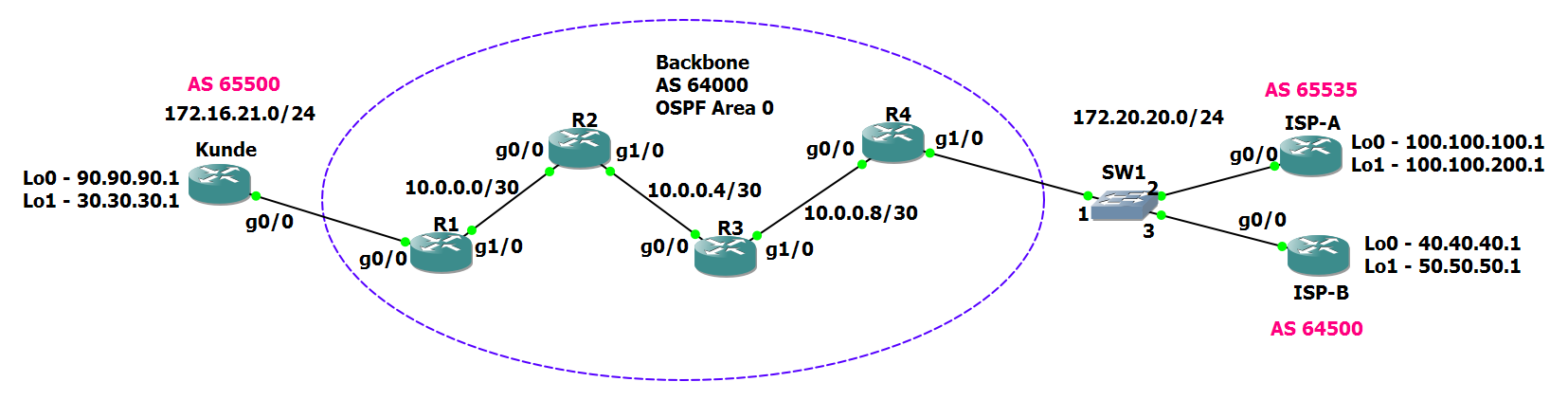
Grundlegende IP-Konfigurationen:
Router Kunde
1
2
3
4
5
Kunde#sh ip int br
Interface                  IP-Address      OK? Method Status                Protocol
Ethernet0/0                unassigned      YES unset  administratively down down
GigabitEthernet0/0         172.16.21.100   YES manual up                    up
GigabitEthernet1/0         unassigned      YES unset  administratively down down
Router R1
1
2
3
4
5
6
Interface                  IP-Address      OK? Method Status                Protocol
Ethernet0/0                unassigned      YES unset  administratively down down
GigabitEthernet0/0         172.16.21.1     YES manual up                    up
GigabitEthernet1/0         10.0.0.1        YES manual up                    up
Loopback0                  197.1.1.1       YES manual up                    up
Loopback1                  200.200.200.1   YES manual up                    up
Router R2
1
2
3
4
5
6
7
R2#sh ip int br
Interface                  IP-Address      OK? Method Status                Protocol
Ethernet0/0                unassigned      YES unset  administratively down down
GigabitEthernet0/0         10.0.0.2        YES manual up                    up
GigabitEthernet1/0         10.0.0.5        YES manual up                    up
Loopback0                  197.1.2.1       YES manual up                    up
Loopback1                  200.200.201.1   YES manual up                    up
Router R3
1
2
3
4
5
6
7
R3#sh ip int br
Interface                  IP-Address      OK? Method Status                Protocol
Ethernet0/0                unassigned      YES unset  administratively down down
GigabitEthernet0/0         10.0.0.6        YES manual up                    up
GigabitEthernet1/0         10.0.0.9        YES manual up                    up
Loopback0                  197.1.3.1       YES manual up                    up
Loopback1                  200.200.202.1   YES manual up                    up
Router R4
1
2
3
4
5
6
7
R4#sh ip int br
Interface                  IP-Address      OK? Method Status                Protocol
Ethernet0/0                unassigned      YES unset  administratively down down
GigabitEthernet0/0         10.0.0.10       YES manual up                    up
GigabitEthernet1/0         172.20.20.1     YES manual up                    up
Loopback0                  197.1.4.1       YES manual up                    up
Loopback1                  200.200.203.1   YES manual up                    up
Router ISP-A
1
2
3
4
5
6
ISP-A#sh ip int br
Interface                  IP-Address      OK? Method Status                Protocol
Ethernet0/0                unassigned      YES unset  administratively down down
GigabitEthernet0/0         172.20.20.2     YES manual up                    up
FastEthernet1/0            unassigned      YES unset  administratively down down
FastEthernet1/1            unassigned      YES unset  administratively down down
Router ISP-B
1
2
3
4
5
6
ISP-B#sh ip int br
Interface                  IP-Address      OK? Method Status                Protocol
Ethernet0/0                unassigned      YES unset  administratively down down
GigabitEthernet0/0         172.20.20.3     YES manual up                    up
FastEthernet1/0            unassigned      YES unset  administratively down down
FastEthernet1/1            unassigned      YES unset  administratively down down
Die Kommunikation von iBGP soll über die Loopback-Adressen stattfinden. Damit diese von BGP benutzt werden, müssen sie im Backbone von allen BGP-Routern erreicht werden. Um dies zu erreichen kann ein IGP verwendet werden. In diesem Falle OSPF.
OSPF
Router R1
1
2
3
4
5
6
7
8
9
10
11
12
13
14
15
16
17
18
19
20
router ospf 64000
 router-id 10.10.10.1
 priority 0
 log-adjacency-changes
 passive-interface default
 no passive-interface GigabitEthernet1/0
 network 10.0.0.0 0.0.0.3 area 0
 network 197.1.1.0 0.0.0.255 area 0
 network 200.200.200.0 0.0.0.255 area 0

interface GigabitEthernet1/0
 description ->R2--g0/0
 ip address 10.0.0.1 255.255.255.252
 no ip redirects
 no ip proxy-arp
 no ip route-cache cef
 no ip route-cache
 ip ospf authentication message-digest
 ip ospf message-digest-key 22 md5 7 051B071C32424B0515
 negotiation auto
Router R2
1
2
3
4
5
6
7
8
9
10
11
12
13
14
15
16
17
18
19
20
21
22
23
24
25
26
27
28
29
30
31
32
33
34
35
36
router ospf 64000
 router-id 10.10.10.10
 priority 10
 log-adjacency-changes
 passive-interface default
 no passive-interface GigabitEthernet0/0
 no passive-interface GigabitEthernet1/0
 network 10.0.0.0 0.0.0.3 area 0
 network 10.0.0.4 0.0.0.3 area 0
 network 197.1.2.0 0.0.0.255 area 0
 network 200.200.201.0 0.0.0.255 area 0

interface GigabitEthernet0/0
 description ->R1--g1/0
 ip address 10.0.0.2 255.255.255.252
 no ip redirects
 no ip proxy-arp
 no ip route-cache cef
 no ip route-cache
 ip ospf authentication message-digest
 ip ospf message-digest-key 22 md5 7 0014121517550E0A03
 duplex full
 speed 1000
 media-type gbic
 negotiation auto

interface GigabitEthernet1/0
 description ->R3--g0/0
 ip address 10.0.0.5 255.255.255.252
 no ip redirects
 no ip proxy-arp
 no ip route-cache cef
 no ip route-cache
 ip ospf authentication message-digest
 ip ospf message-digest-key 22 md5 7 0014121517550E0A03
 negotiation auto
Router R3
1
2
3
4
5
6
7
8
9
10
11
12
13
14
15
16
17
18
19
20
21
22
23
24
25
26
27
28
29
30
31
32
33
34
35
36
router ospf 64000
 router-id 10.10.10.9
 priority 9
 log-adjacency-changes
 passive-interface default
 no passive-interface GigabitEthernet0/0
 no passive-interface GigabitEthernet1/0
 network 10.0.0.4 0.0.0.3 area 0
 network 10.0.0.8 0.0.0.3 area 0
 network 197.1.3.0 0.0.0.255 area 0
 network 200.200.202.0 0.0.0.255 area 0

interface GigabitEthernet0/0
 description ->R2--g1/0
 ip address 10.0.0.6 255.255.255.252
 no ip redirects
 no ip proxy-arp
 no ip route-cache cef
 no ip route-cache
 ip ospf authentication message-digest
 ip ospf message-digest-key 22 md5 7 0014121517550E0A03
 duplex full
 speed 1000
 media-type gbic
 negotiation auto

interface GigabitEthernet1/0
 description ->R4--g0/0
 ip address 10.0.0.9 255.255.255.252
 no ip redirects
 no ip proxy-arp
 no ip route-cache cef
 no ip route-cache
 ip ospf authentication message-digest
 ip ospf message-digest-key 22 md5 7 0014121517550E0A03
 negotiation auto
Router R4
1
2
3
4
5
6
7
8
9
10
11
12
13
14
15
16
17
18
19
20
21
22
23
router ospf 64000
 router-id 10.10.10.2
 priority 1
 log-adjacency-changes
 passive-interface default
 no passive-interface GigabitEthernet0/0
 network 10.0.0.8 0.0.0.3 area 0
 network 197.1.4.0 0.0.0.255 area 0
 network 200.200.203.0 0.0.0.255 area 0

interface GigabitEthernet0/0
 description ->R3--g1/0
 ip address 10.0.0.10 255.255.255.252
 no ip redirects
 no ip proxy-arp
 no ip route-cache cef
 no ip route-cache
 ip ospf authentication message-digest
 ip ospf message-digest-key 22 md5 7 140713181F0A2F2728
 duplex full
 speed 1000
 media-type gbic
 negotiation auto
Nachdem alle OSPF-Prozesse gestartet sind, sollte die Routingtabelle von R4 folgendermaßen aussehen:
1
2
3
4
5
6
7
8
9
10
11
12
13
14
15
16
17
18
19
20
21
22
23
24
25
26
R4#sh ip route ospf
Codes: L - local, C - connected, S - static, R - RIP, M - mobile, B - BGP
       D - EIGRP, EX - EIGRP external, O - OSPF, IA - OSPF inter area
       N1 - OSPF NSSA external type 1, N2 - OSPF NSSA external type 2
       E1 - OSPF external type 1, E2 - OSPF external type 2
       i - IS-IS, su - IS-IS summary, L1 - IS-IS level-1, L2 - IS-IS level-2
       ia - IS-IS inter area, * - candidate default, U - per-user static route
       o - ODR, P - periodic downloaded static route, + - replicated route

Gateway of last resort is not set

      10.0.0.0/8 is variably subnetted, 4 subnets, 2 masks
O        10.0.0.0/30 [110/3] via 10.0.0.9, 00:10:12, GigabitEthernet0/0
O        10.0.0.4/30 [110/2] via 10.0.0.9, 00:10:22, GigabitEthernet0/0
      197.1.1.0/32 is subnetted, 1 subnets
O        197.1.1.1 [110/4] via 10.0.0.9, 00:10:02, GigabitEthernet0/0
      197.1.2.0/32 is subnetted, 1 subnets
O        197.1.2.1 [110/3] via 10.0.0.9, 00:10:12, GigabitEthernet0/0
      197.1.3.0/32 is subnetted, 1 subnets
O        197.1.3.1 [110/2] via 10.0.0.9, 00:10:22, GigabitEthernet0/0
      200.200.200.0/32 is subnetted, 1 subnets
O        200.200.200.1 [110/4] via 10.0.0.9, 00:10:02, GigabitEthernet0/0
      200.200.201.0/32 is subnetted, 1 subnets
O        200.200.201.1 [110/3] via 10.0.0.9, 00:10:12, GigabitEthernet0/0
      200.200.202.0/32 is subnetted, 1 subnets
O        200.200.202.1 [110/2] via 10.0.0.9, 00:10:24, GigabitEthernet0/0
Ein ping sollte auf das Loopback-Interface von R1 erfolgreich sein.
1
2
3
4
5
6
R4#ping 200.200.201.1

Type escape sequence to abort.
Sending 5, 100-byte ICMP Echos to 200.200.201.1, timeout is 2 seconds:
!!!!!
Success rate is 100 percent (5/5), round-trip min/avg/max = 16/36/60 ms
Sollte das nicht der Fall sein: Fehlersuchen!
Damit wäre die grundlegende Einrichtung abgeschlossen.
BGP Basic Session zwischen R4 und ISP-A
Zwischen R4 und ISP-A wird eine BGP-Session eingerichtet. Alle Netze von R4 sollen an ISP-A veröffentlicht werden.
Router R4
1
2
3
4
5
6
7
8
9
10
11
12
13
router bgp 64000
 bgp log-neighbor-changes
 neighbor 172.20.20.2 remote-as 65535
 neighbor 172.20.20.2 password 7 06160E325F400C1509

 address-family ipv4
  no synchronization
  network 197.1.4.0
  network 200.200.203.0
  neighbor 172.20.20.2 activate
  neighbor 172.20.20.2 soft-reconfiguration inbound
  no auto-summary
 exit-address-family
Router ISP-A
1
2
3
4
5
6
7
8
9
10
11
12
13
14
router bgp 65535
bgp log-neighbor-changes
neighbor 172.20.20.1 remote-as 64000
neighbor 172.20.20.1 password 7 0014121517550E0A03
address-family ipv4
no synchronization
network 172.20.20.0 mask 255.255.255.0
network 100.100.100.0 mask 255.255.255.0
network 100.100.200.0 mask 255.255.255.0
neighbor 172.20.20.1 activate
neighbor 172.20.20.1 soft-reconfiguration inbound
no auto-summary
exit-address-family
Anschließend sollten die ersten BGP-Einträge in der Routingtabelle auftauchen.
1
2
3
4
5
6
7
8
9
10
11
12
13
14
15
16
17
18
19
20
21
22
23
24
25
26
27
28
29
30
31
ISP-A#sh ip route
Codes: L - local, C - connected, S - static, R - RIP, M - mobile, B - BGP
       D - EIGRP, EX - EIGRP external, O - OSPF, IA - OSPF inter area
       N1 - OSPF NSSA external type 1, N2 - OSPF NSSA external type 2
       E1 - OSPF external type 1, E2 - OSPF external type 2
       i - IS-IS, su - IS-IS summary, L1 - IS-IS level-1, L2 - IS-IS level-2
       ia - IS-IS inter area, * - candidate default, U - per-user static route
       o - ODR, P - periodic downloaded static route, + - replicated route

Gateway of last resort is not set

      172.20.0.0/16 is variably subnetted, 2 subnets, 2 masks
C        172.20.20.0/24 is directly connected, GigabitEthernet0/0
L        172.20.20.2/32 is directly connected, GigabitEthernet0/0
B     197.1.4.0/24 [20/0] via 172.20.20.1, 00:03:10
B     200.200.203.0/24 [20/0] via 172.20.20.1, 00:03:10

R4#sh ip route bgp
Codes: L - local, C - connected, S - static, R - RIP, M - mobile, B - BGP
       D - EIGRP, EX - EIGRP external, O - OSPF, IA - OSPF inter area
       N1 - OSPF NSSA external type 1, N2 - OSPF NSSA external type 2
       E1 - OSPF external type 1, E2 - OSPF external type 2
       i - IS-IS, su - IS-IS summary, L1 - IS-IS level-1, L2 - IS-IS level-2
       ia - IS-IS inter area, * - candidate default, U - per-user static route
       o - ODR, P - periodic downloaded static route, + - replicated route

Gateway of last resort is not set

     100.0.0.0/24 is subnetted, 2 subnets
B        100.100.100.0 [20/0] via 172.20.20.2, 00:00:38
B        100.100.200.0 [20/0] via 172.20.20.2, 00:00:08
Damit existiert eine BGP-Session zwischen R4 und ISP-A.
Erweiterung zum Transit-AS
Das Backbone soll jetzt zum Transit-AS konfiguriert werden. Dafür wird iBGP verwendet. iBGP Updates erfolgen über die jeweiligen Loopback-Interfaces lo0. Wichtig ist die Konfiguration von “nexthop-self”. BGP geht davon aus, dass entfernten Netze vom jeweiligen Nachbarrouter direkt erreichbar sind. Dies ist hier jedoch nicht der Fall, daher muss der Nachbarrouter sich als Hop für enternte Netze ausgeben.
Anpassung Router R4
1
2
3
4
5
6
7
8
9
10
11
12
13
14
15
16
17
18
19
20
21
22
23
24
25
router bgp 64000
 bgp log-neighbor-changes
 neighbor 172.20.20.2 remote-as 65535
 neighbor 172.20.20.2 password 7 06160E325F400C1509
 neighbor 197.1.1.1 remote-as 64000
 neighbor 197.1.1.1 update-source Loopback0
 neighbor 197.1.2.1 remote-as 64000
 neighbor 197.1.2.1 update-source Loopback0
 neighbor 197.1.3.1 remote-as 64000
 neighbor 197.1.3.1 update-source Loopback0
 !
 address-family ipv4
  no synchronization
  network 197.1.4.0
  redistribute ospf 64000 route-map set_origin
  neighbor 172.20.20.2 activate
  neighbor 172.20.20.2 soft-reconfiguration inbound
  neighbor 197.1.1.1 activate
  neighbor 197.1.1.1 next-hop-self
  neighbor 197.1.2.1 activate
  neighbor 197.1.2.1 next-hop-self
  neighbor 197.1.3.1 activate
  neighbor 197.1.3.1 next-hop-self
  no auto-summary
 exit-address-family
Um die Routingtabellen etwas zu füllen, wird OSPF ins BGP redistributiert. Damit in der BGP-Tabelle keine “incompletes” entstehen, wird mittels route-map manipuliert und alle Routen als igp ausgegeben. Die Adressen der “nicht”-Backbone-Router werden ausgenommen.
Router R4 Erweiterung
1
2
3
4
5
6
7
access-list 1 deny   172.16.21.0
access-list 1 deny   172.20.20.0
access-list 1 permit any

route-map set_origin permit 10
 match ip address 1
 set origin igp
Router R3
1
2
3
4
5
6
7
8
9
10
11
12
13
14
15
16
router bgp 64000
 bgp log-neighbor-changes
 neighbor 197.1.1.1 remote-as 64000
 neighbor 197.1.1.1 update-source Loopback0
 neighbor 197.1.2.1 remote-as 64000
 neighbor 197.1.2.1 update-source Loopback0
 neighbor 197.1.4.1 remote-as 64000
 neighbor 197.1.4.1 update-source Loopback0
 !
 address-family ipv4
  no synchronization
  neighbor 197.1.1.1 activate
  neighbor 197.1.2.1 activate
  neighbor 197.1.4.1 activate
  no auto-summary
 exit-address-family
Router R2
1
2
3
4
5
6
7
8
9
10
11
12
13
14
15
16
router bgp 64000
 bgp log-neighbor-changes
 neighbor 197.1.1.1 remote-as 64000
 neighbor 197.1.1.1 update-source Loopback0
 neighbor 197.1.3.1 remote-as 64000
 neighbor 197.1.3.1 update-source Loopback0
 neighbor 197.1.4.1 remote-as 64000
 neighbor 197.1.4.1 update-source Loopback0
 !
 address-family ipv4
  no synchronization
  neighbor 197.1.1.1 activate
  neighbor 197.1.3.1 activate
  neighbor 197.1.4.1 activate
  no auto-summary
 exit-address-family
Anpassungen Router R1
1
2
3
4
5
6
7
8
9
10
11
12
13
14
15
16
17
18
19
20
21
22
23
24
router bgp 64000
 bgp log-neighbor-changes
 neighbor 172.16.21.100 remote-as 65500
 neighbor 172.16.21.100 password 7 11191816041C0E0008
 neighbor 197.1.2.1 remote-as 64000
 neighbor 197.1.2.1 update-source Loopback0
 neighbor 197.1.3.1 remote-as 64000
 neighbor 197.1.3.1 update-source Loopback0
 neighbor 197.1.4.1 remote-as 64000
 neighbor 197.1.4.1 update-source Loopback0
 !
 address-family ipv4
  no synchronization
  network 197.1.1.0
  neighbor 172.16.21.100 activate
  neighbor 172.16.21.100 soft-reconfiguration inbound
  neighbor 197.1.2.1 activate
  neighbor 197.1.2.1 next-hop-self
  neighbor 197.1.3.1 activate
  neighbor 197.1.3.1 next-hop-self
  neighbor 197.1.4.1 activate
  neighbor 197.1.4.1 next-hop-self
  no auto-summary
 exit-address-family
Damit sollten nach einer Weile die Router ISP-A und Kunde in der Lage sein, sich zu pingen.
1
2
3
4
5
6
7
8
9
10
11
12
13
Kunde#ping 100.100.100.1

Type escape sequence to abort.
Sending 5, 100-byte ICMP Echos to 100.100.100.1, timeout is 2 seconds:
!!!!!
Success rate is 100 percent (5/5), round-trip min/avg/max = 200/226/256 ms

ISP-A#ping 90.90.90.1

Type escape sequence to abort.
Sending 5, 100-byte ICMP Echos to 90.90.90.1, timeout is 2 seconds:
!!!!!
Success rate is 100 percent (5/5), round-trip min/avg/max = 124/153/184 ms
Ein Trace wird ebenfalls funktionieren:
1
2
3
4
5
6
7
8
9
10
11
12
13
14
15
16
17
18
19
20
21
Kunde#trace 100.100.100.1

Type escape sequence to abort.
Tracing the route to 100.100.100.1

  1 172.16.21.1 4 msec 40 msec 32 msec
  2 10.0.0.2 [AS 64000] 64 msec 52 msec 68 msec
  3 10.0.0.6 [AS 64000] 72 msec 112 msec 72 msec
  4 10.0.0.10 [AS 64000] 136 msec 132 msec 100 msec
  5 172.20.20.2 [AS 65535] 160 msec 140 msec 136 msec

ISP-A#trace 90.90.90.1

Type escape sequence to abort.
Tracing the route to 90.90.90.1

  1 172.20.20.1 4 msec 12 msec 8 msec
  2 10.0.0.9 [AS 64000] 8 msec 16 msec 16 msec
  3 10.0.0.5 [AS 64000] 52 msec 40 msec 40 msec
  4 10.0.0.1 [AS 64000] 40 msec 48 msec 52 msec
  5 172.16.21.100 [AS 65500] 52 msec 60 msec 56 msec
Die Routingtabellen haben sich mit BGP-Einträgen gefüllt:
1
2
3
4
5
6
7
8
9
10
11
12
13
14
15
16
17
18
19
20
21
22
23
24
25
26
27
28
29
30
31
32
33
34
35
Kunde#sh ip route bgp
Codes: L - local, C - connected, S - static, R - RIP, M - mobile, B - BGP
       D - EIGRP, EX - EIGRP external, O - OSPF, IA - OSPF inter area
       N1 - OSPF NSSA external type 1, N2 - OSPF NSSA external type 2
       E1 - OSPF external type 1, E2 - OSPF external type 2
       i - IS-IS, su - IS-IS summary, L1 - IS-IS level-1, L2 - IS-IS level-2
       ia - IS-IS inter area, * - candidate default, U - per-user static route
       o - ODR, P - periodic downloaded static route, + - replicated route

Gateway of last resort is not set

      10.0.0.0/30 is subnetted, 3 subnets
B        10.0.0.0 [20/0] via 172.16.21.1, 00:05:29
B        10.0.0.4 [20/0] via 172.16.21.1, 00:05:29
B        10.0.0.8 [20/0] via 172.16.21.1, 00:05:29
      100.0.0.0/24 is subnetted, 2 subnets
B        100.100.100.0 [20/0] via 172.16.21.1, 00:05:09
B        100.100.200.0 [20/0] via 172.16.21.1, 00:05:09
      172.20.0.0/24 is subnetted, 1 subnets
B        172.20.20.0 [20/0] via 172.16.21.1, 00:05:09
      197.1.1.0/24 is variably subnetted, 2 subnets, 2 masks
B        197.1.1.0/24 [20/0] via 172.16.21.1, 00:05:29
B        197.1.1.1/32 [20/0] via 172.16.21.1, 00:05:29
      197.1.2.0/32 is subnetted, 1 subnets
B        197.1.2.1 [20/0] via 172.16.21.1, 00:05:29
      197.1.3.0/32 is subnetted, 1 subnets
B        197.1.3.1 [20/0] via 172.16.21.1, 00:05:29
B     197.1.4.0/24 [20/0] via 172.16.21.1, 00:05:29
      200.200.200.0/32 is subnetted, 1 subnets
B        200.200.200.1 [20/0] via 172.16.21.1, 00:05:29
      200.200.201.0/32 is subnetted, 1 subnets
B        200.200.201.1 [20/0] via 172.16.21.1, 00:05:29
      200.200.202.0/32 is subnetted, 1 subnets
B        200.200.202.1 [20/0] via 172.16.21.1, 00:05:29
B     200.200.203.0/24 [20/0] via 172.16.21.1, 00:05:29
Damit ist das Transit-AS fertig.
Aggregieren von BGP-Routen
Damit die Routingtabellen von ISP-A etwas reduziert werden, können diese auf R4 aggregiert werden.
ISP-A vorher
1
2
3
4
5
6
7
8
9
10
11
12
13
14
15
16
17
18
19
20
21
22
23
24
25
26
ISP-A#sh ip bgp
BGP table version is 19, local router ID is 100.100.200.1
Status codes: s suppressed, d damped, h history, * valid, > best, i - internal,
              r RIB-failure, S Stale
Origin codes: i - IGP, e - EGP, ? - incomplete

   Network          Next Hop            Metric LocPrf Weight Path
*> 10.0.0.0/30      172.20.20.1              3             0 64000 i
*> 10.0.0.4/30      172.20.20.1              2             0 64000 i
*> 10.0.0.8/30      172.20.20.1              0             0 64000 i
*> 30.30.30.0/24    172.20.20.1                            0 64000 65500 i
*> 90.90.90.0/24    172.20.20.1                            0 64000 65500 i
*> 100.100.100.0/24 0.0.0.0                  0         32768 i
*> 100.100.200.0/24 0.0.0.0                  0         32768 i
*> 172.16.21.0/24   172.20.20.1                            0 64000 65500 i
*> 172.20.20.0/24   0.0.0.0                  0         32768 i
*> 197.1.1.0        172.20.20.1                            0 64000 i
*> 197.1.1.1/32     172.20.20.1              4             0 64000 i
*> 197.1.2.1/32     172.20.20.1              3             0 64000 i
*> 197.1.3.1/32     172.20.20.1              2             0 64000 i
*> 197.1.4.0        172.20.20.1              0             0 64000 i
*> 200.200.200.1/32 172.20.20.1              4             0 64000 i
*> 200.200.201.1/32 172.20.20.1              3             0 64000 i
*> 200.200.202.1/32 172.20.20.1              2             0 64000 i
   Network          Next Hop            Metric LocPrf Weight Path
*> 200.200.203.0    172.20.20.1              0             0 64000 i
Anpassungen auf R4
1
2
3
aggregate-address 200.200.200.0 255.255.252.0 summary-only
aggregate-address 197.1.0.0 255.255.252.0 summary-only
aggregate-address 10.0.0.0 255.255.0.0 summary-only
ISP-A nachher
1
2
3
4
5
6
7
8
9
10
11
12
13
14
15
16
17
18
19
20
21
22
23
24
ISP-A#sh ip route b
Codes: L - local, C - connected, S - static, R - RIP, M - mobile, B - BGP
       D - EIGRP, EX - EIGRP external, O - OSPF, IA - OSPF inter area
       N1 - OSPF NSSA external type 1, N2 - OSPF NSSA external type 2
       E1 - OSPF external type 1, E2 - OSPF external type 2
       i - IS-IS, su - IS-IS summary, L1 - IS-IS level-1, L2 - IS-IS level-2
       ia - IS-IS inter area, * - candidate default, U - per-user static route
       o - ODR, P - periodic downloaded static route, + - replicated route

Gateway of last resort is not set

      10.0.0.0/30 is subnetted, 3 subnets
B        10.0.0.0 [20/3] via 172.20.20.1, 00:14:55
B        10.0.0.4 [20/2] via 172.20.20.1, 00:14:55
B        10.0.0.8 [20/0] via 172.20.20.1, 00:14:55
      30.0.0.0/24 is subnetted, 1 subnets
B        30.30.30.0 [20/0] via 172.20.20.1, 00:14:35
      90.0.0.0/24 is subnetted, 1 subnets
B        90.90.90.0 [20/0] via 172.20.20.1, 00:14:35
      172.16.0.0/24 is subnetted, 1 subnets
B        172.16.21.0 [20/0] via 172.20.20.1, 00:14:35
B     197.1.0.0/22 [20/0] via 172.20.20.1, 00:00:28
B     197.1.4.0/24 [20/0] via 172.20.20.1, 00:14:55
B     200.200.200.0/22 [20/0] via 172.20.20.1, 00:00:58
Damit sind einige Routingeinträge zusammengefasst, was Ressourcen schont.
Aufnahme eines zweiten Providers (Multihomed BGP)
Um ISP-B als “besseren” ISP zu konfigurieren, wird das Kommando weight verwendet. Achtung: das ist eine Cisco eigene Lösung. Alternativ können Localpreferences verwendet werden.
Anpassungen Router R4
1
2
3
4
5
neighbor 172.20.20.100 remote-as 64500
neighbor 172.20.20.100 password 7 03145A181501244042
neighbor 172.20.20.100 activate
neighbor 172.20.20.100 weight 200
neighbor 172.20.20.100 soft-reconfiguration inbound
Sollten ISP-A und ISP-B Routen gleiche Routen zu einem externen Netz haben, wird der Weg über ISP-B genommen.
Das wären die groben Basics von BGP.